Mobolist: Phone Prices & Specs
- 4.5
- Rating
- 1.00M
- Installs
- Free
- Price

 Analysis by App-foxy
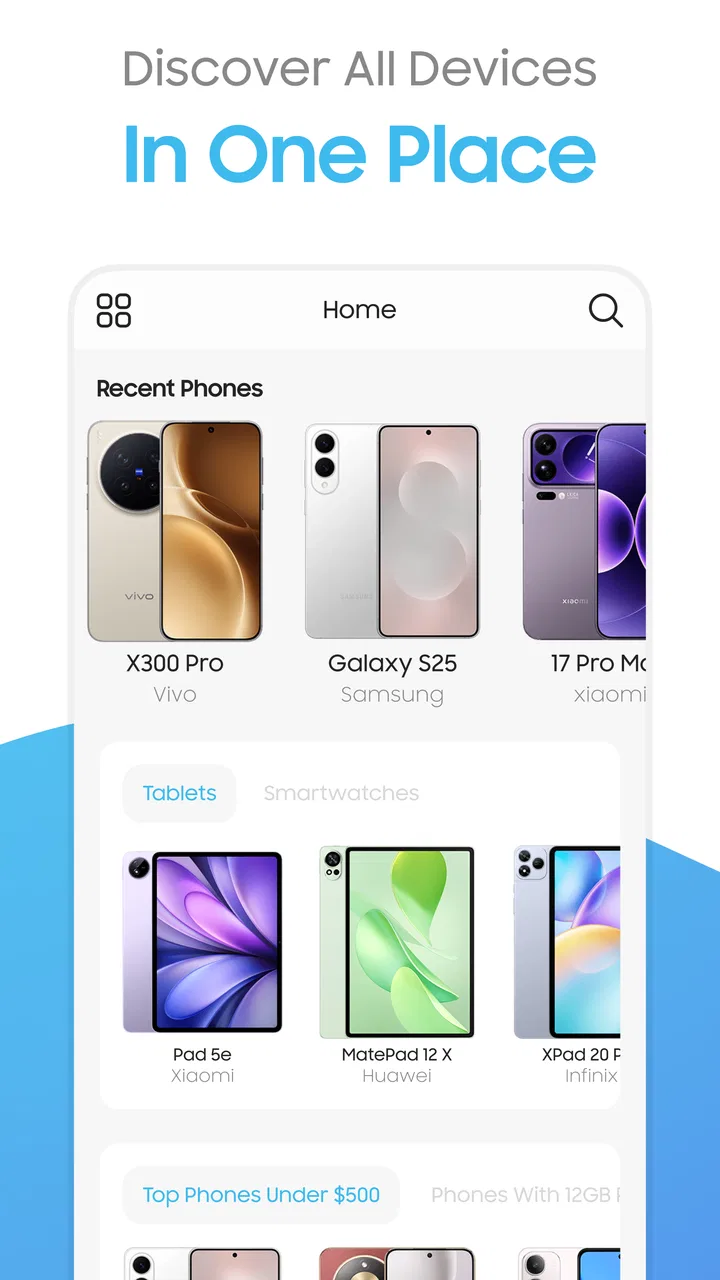
Choosing a phone is often harder than using one. Specifications are scattered across product pages, prices change, and two devices can look almost identical while offering very different cameras, screens, batteries, or software support. Mobolist: Phone Prices & Specs is designed to make that early research less tiring by bringing phone, tablet, and smartwatch information into a single news and shopping-research app.
I found its main appeal in the moment before a purchase, when I already have a few devices in mind but need a clearer way to separate them. Rather than opening several browser tabs and trying to remember which model had which feature, I can use Mobolist to browse device information and compare options more directly. It is free to download, although it includes optional in-app purchases ranging from $1.99 to $14.99 per item.
The app comes from Mobolist and is aimed at a broad audience. Its Everyone content rating makes it suitable for ordinary household use, including someone helping a parent, partner, or child choose a new device. It is available for Android devices running version 8.0 or later, and the current version is 3.0.1. Those details matter because this is the kind of utility people often install quickly while researching a purchase, so compatibility should be checked before expecting to use it.
You May Also Like

 Blood Strike: 2.5 Anniversary
Blood Strike’s Loadouts Turn Every Drop Into a Tactical Gamble
A close look at Blood Strike’s custom loadouts: how fast access to signature weapons reshapes its battle royale rhythm, rewards preparation, and narrows the gap between fights.

 Pandora - Music & Podcasts
Pandora’s Music Is Easy to Start, but Harder to Recover
Pandora’s strength is its low-effort path from a seed to a station. Its weak spot is how much confidence it asks you to place in connection, setup, and quiet recovery.

 8 Ball Pool
 Is Built on Rivalries, Rematches, and Routine
A close look at the rivalries, rematches, shared routines, and unanswered safety questions that turn a quick pool match into a persistent mobile community.

 Samsung Music
’s Quiet Strength Is Playing What You Already Own
Its reach comes less from spectacle than from dependable access to a personal library. That simplicity is both the app’s strongest retention engine and its ceiling.

 AccuWeather: Weather Radar
AccuWeather Review: A Quick, Clear Forecast for Everyday Decisions
For everyday plans, the best forecast is the one you can understand quickly. AccuWeather makes rain timing, radar, and local conditions easy to act on, with a few trade-offs.

 Hill Climb Racing
Why Hill Climb Racing Still Turns Crashes Into One More Run
A tiny car, a bumpy hill and one more upgrade: Hill Climb Racing keeps resurfacing because its simple chaos makes every near-miss feel personal.
More From Our News Desk



What using Mobolist feels like for a first-time visitor
My first impression is that Mobolist works best as a focused reference tool rather than as a complete shopping destination. The useful question is not simply “what is the latest phone?” but “which device makes sense for the way I use my phone?” The app helps move that question toward concrete specifications and side-by-side checking.
That distinction is important. A product page may emphasize a camera count or a large display, while a comparison reveals the practical differences that are easier to overlook. A phone with a faster processor may be more appropriate for games, while another with a simpler specification mix may be a better fit for messaging, maps, photos, and long battery use. Mobolist is valuable when I treat the specifications as evidence for a decision, not as a collection of impressive numbers.
The catalog is not limited to smartphones. Tablets and smartwatches are also part of the app’s scope, which makes it useful when a device upgrade is still undecided. I can begin by checking phones, then move to a tablet for reading or a watch for notifications and activity tracking. That wider range is convenient for households comparing several kinds of technology at once.
Its popularity also suggests that it has reached beyond a small group of enthusiasts. Mobolist has more than a million installs and an average rating of 4.3 from roughly fourteen thousand ratings. I would not treat those figures as proof that every device entry will suit every reader, but they do indicate that the app has become a familiar research option for many Android users.
The strongest expectation to set is this: Mobolist can organize research, but it cannot make the buying decision for you. Specifications do not always reveal camera processing quality, comfort in the hand, speaker quality, update habits, or how a particular phone feels after a week. I use the app to narrow the field, then look for hands-on impressions and retailer details before spending money.
Why it can be more useful than a normal web search
Web search is flexible, but it can also create a messy trail of manufacturer pages, retailer listings, old reviews, and copied specifications. Mobolist gives me a more device-centered workflow. Instead of beginning with a general search phrase, I can start from a model and inspect the information that matters for comparison.
That saves time when I already know the names of two or three candidates. It is also helpful when a model has several variants and I need to slow down before assuming that every listing represents the same configuration. A careful reader should still check the exact regional model and storage option elsewhere, but the app provides a sensible place to organize the first pass.
I also prefer this approach for people who do not enjoy technology research. A long review can be informative but overwhelming, especially when it mixes opinion with specifications. Mobolist puts the factual side of the investigation closer to the surface, allowing a beginner to form a shortlist before reading more specialized commentary.
The first setup: keep the goal small
After installing Mobolist, I recommend starting with one purchase question rather than browsing everything at once. For example, decide whether you are researching a phone for photography, gaming, travel, work, or basic daily communication. This simple choice gives the app a purpose and prevents the first session from turning into endless scrolling through attractive but irrelevant models.
A good first session begins with two or three devices that are already on your radar. Search for the exact model names, open their specifications, and note the differences that connect to your own routine. If you are replacing an older phone, keep it nearby and compare the points that affect your experience most: screen size, camera hardware, battery information, connectivity, and processing capability.
I would not begin by trying to memorize every specification. That is one of the easiest ways to get lost. Instead, I write down a short list of requirements before opening the app. “Comfortable for one-handed use,” “good low-light photos,” or “enough performance for demanding games” is more useful than collecting ten unrelated figures.
The app is free to start, which lowers the barrier for casual research. Optional purchases are present, so I would pay attention to any purchase prompt and decide whether it adds value to my particular workflow. Someone comparing one phone for a family member may never need to spend anything, while a frequent device researcher may judge an optional feature differently.
Because the app supports Android 8.0 and later, I would check the operating system on an older spare phone before relying on it during a shopping trip. This is a small step, but it avoids the frustrating situation of discovering compatibility problems at the exact moment you want to compare devices in a store.
Turning the first search into a meaningful result
The first successful action should be practical: use Mobolist to eliminate at least one device from your shortlist. That sounds modest, but it is more useful than simply finding a favorite. If a phone lacks a feature you genuinely need, identifying that early saves time and prevents an impulse purchase based on appearance or a promotional headline.
For example, imagine I am helping a relative replace an aging phone. They mainly use messaging, video calls, maps, and photos, but they do not play demanding games. I would open a few likely models, compare their relevant specifications, and remove any option whose extra performance does not justify its trade-offs. I would then check which remaining model offers the most sensible balance for that person, rather than automatically choosing the most expensive device.
Another realistic use is preparing for a sale or store visit. Before leaving home, I can compare the models I expect to see and identify the specifications that separate them. In the shop, I can focus on physical details the app cannot settle, such as weight, grip, screen visibility, and the feel of the software. This two-part process is stronger than relying on either online research or hands-on testing alone.
A useful habit is to compare like with like. Match phones with similar storage levels and closely related release generations where possible. Otherwise, a difference in configuration can make one model appear better or worse than it really is. Mobolist can help surface the information, but the quality of the conclusion still depends on how carefully I frame the comparison.
I also use the app to create questions for further research. If one device appears stronger on paper, I ask whether independent testing agrees about battery endurance, camera results, or thermal behavior. If a tablet looks attractive, I check whether its size and software fit the way I plan to read, work, or watch video. The app’s best contribution is often the question it helps me ask next.
Where beginners can become confused
The biggest source of confusion is assuming that a larger specification automatically means a better experience. More megapixels do not guarantee better photos, a faster chip may be unnecessary for light users, and a bigger screen can make a device less comfortable to carry. I treat every specification as a clue, not a verdict.
Another common mistake is comparing a phone and a tablet as though they solve the same problem. Mobolist covers both, but the right choice depends on how the device will be used. A tablet may be more comfortable for reading and video, while a phone remains the practical choice for calls, navigation, and carrying everywhere. The app can place both categories within reach, but it cannot replace that personal context.
Model names can also be misleading. Manufacturers often release families with similar names, and a small difference in the title may represent a substantial change in hardware. I double-check the full model name before comparing anything, especially when a retailer or friend has mentioned only a shortened version.
Prices deserve similar caution. Mobolist is useful for researching device information and prices, but a price seen during research should not be treated as a permanent promise. Retailer stock, region, storage configuration, taxes, and promotions can all affect the amount ultimately paid. I use the app to understand the product and establish a reasonable comparison point, then confirm the final purchase details at the seller.
The presence of in-app purchases is another point worth understanding. The app itself is free, which is convenient for occasional users, but optional paid items mean that not every part of the experience necessarily follows the same no-cost path. I would avoid paying simply because a prompt appears during browsing. First I would complete a normal comparison and decide whether the extra purchase solves a real problem for me.
Three practical habits that improve the results
First, compare for a person, not for a leaderboard. When I research a device for someone else, I translate specifications into daily consequences. A large display may help reading, but it may also be awkward for small hands. Strong performance may be valuable for gaming, but it may add cost without improving a simple messaging routine. This approach prevents the app from turning into a contest of impressive numbers.
Second, use a two-stage shortlist. In the first stage, I use Mobolist to remove devices that clearly miss a requirement. In the second, I inspect the remaining options in person or through detailed independent reviews. This is more efficient than deeply researching every model from the beginning, and it acknowledges the app’s limitation: specifications cannot communicate every aspect of ownership.
Third, check the surrounding ecosystem before deciding. A phone, tablet, or smartwatch rarely exists alone. I think about chargers, accessories, existing devices, and the routines the new product must fit. Mobolist helps me compare the device itself, but the final choice should also consider whether it will cooperate with the technology I already use.
A fourth habit is especially helpful for beginners: save a written reason for each finalist. “Chosen because the screen is easier to read” is more useful than “chosen because the specs look better.” If I revisit the decision later, I can see whether the original priority still matters instead of being distracted by a newer model or a more attractive promotional image.
Who will get the most from it
Mobolist is a good fit for someone who wants a quick, structured way to research phones without opening a separate page for every model. It is also useful for families, because one person can gather the basic information before discussing the options with someone who is less comfortable with technology.
Students and first-time buyers may appreciate the app as a vocabulary-building tool. Looking at several devices side by side makes terms and categories less abstract. Instead of encountering specifications in isolation, I can connect them to a real choice: whether a device seems appropriate for schoolwork, entertainment, photography, or everyday communication.
It can also help enthusiasts who compare more than one category. Someone deciding between a phone upgrade and a tablet purchase can use the same app as a starting point, rather than maintaining separate research habits. The value here is convenience and organization, not a promise that one screen can answer every technical question.
I would be less enthusiastic about recommending it to a person who wants a complete buying service with checkout, delivery tracking, financing, or extensive editorial testing. Mobolist is better understood as a research companion. If your priority is reading long-term ownership reports, watching detailed camera tests, or buying immediately from one retailer, a browser, specialist review site, or shopping app may be a better primary tool.
How it compares with the usual alternatives
Compared with a general search engine, Mobolist feels more focused because the research begins with devices and their specifications rather than a mixture of advertisements, news, forums, and retailer results. The trade-off is that a search engine can reach a wider range of hands-on opinions and current purchasing information.
Compared with manufacturer pages, the app can be more convenient when I am comparing different brands. A manufacturer naturally presents its own products in the best possible light, while a cross-device research workflow encourages me to look beyond one company’s lineup. I still return to official pages when checking final configuration details, but I prefer a broader starting point.
Compared with specialist review sites, Mobolist is quicker for an initial scan. Specialist sites are usually better for camera samples, sustained gaming performance, battery testing, software impressions, and long-term ownership concerns. My preferred method is to use Mobolist for the shortlist and specialist reviews for the final confidence check.
Compared with a retailer’s app, Mobolist is more useful before I have decided where to buy. Retailer apps are stronger for stock, delivery, discounts, and checkout, but they may encourage me to browse according to what is being sold at that moment. Mobolist keeps the comparison question in front of me, which helps reduce the chance of choosing solely because one product is prominently displayed.
What I would improve in my own workflow
I would avoid using the app passively. Scrolling through new devices can be entertaining, but it does not necessarily produce a better decision. I get more value by opening it with a clear task, such as comparing two phones for camera use or checking whether a tablet makes sense for reading.
I would also resist treating the average rating as a substitute for personal testing. Mobolist has a 4.3 average and around fourteen thousand ratings, which is encouraging, but ratings summarize many different expectations. A person who wants a simple specification checker may be delighted, while another user expecting detailed editorial analysis may want more.
The app has been available since December 13, 2019, and its current version is 3.0.1. I see that history as a sign that it is an established tool rather than a brand-new experiment, while still remembering that device information and market prices change quickly. Before making a major purchase, I would refresh my research and confirm the final details through current seller or manufacturer information.
Privacy-conscious users should make their own comfort assessment before installing any app, as they should with every research tool. I would also keep purchase decisions separate from the convenience of the interface. A smooth comparison session is useful, but it should not push me toward paying for an optional item or choosing a device that does not fit my needs.
My recommendation after using it
I recommend Mobolist to first-time buyers who want a calmer starting point for phone, tablet, and smartwatch research. The path is straightforward: choose a specific goal, find a small set of devices, compare the details that affect your routine, remove at least one unsuitable option, and then verify the finalists through hands-on experience or deeper testing.
Its greatest strength is not that it makes every purchase decision effortless. It is that it gives a beginner a place to begin without immediately becoming buried in scattered pages and technical language. That is a meaningful benefit when the choice feels confusing.
I would skip it as my main tool if I needed checkout, delivery information, or extensive real-world testing. For those needs, a retailer or specialist review source is stronger. But as a free research aid from Mobolist, it earns a place in my preparation process, especially when I am comparing several devices and want the basic differences in one organized setting.
My practical advice is to use Mobolist to narrow your options, not to end your research. Let it help you identify the models worth handling and investigating further. Once the shortlist matches your actual habits, confirm the price and configuration, test the device if possible, and choose the one that solves your everyday problem rather than the one with the most impressive-looking specification sheet.
FAQs for Mobolist: Phone Prices & Specs
01What is Mobolist: Phone Prices & Specs and how does it work?
Mobolist: Phone Prices & Specs is an app designed to provide users with comprehensive information on various smartphones. It allows users to compare phone prices and specifications across different regions and retailers. The app is intuitive, offering filters to refine searches based on brand, features, and price range, making it easier for users to find the ideal phone that meets their needs.
02Is Mobolist free to use, or are there any in-app purchases?
Mobolist is free to download and use, providing access to a wide range of phone data without any cost. However, some advanced features or ad-free experiences might require in-app purchases. Users should check the app store listing for specific details on any additional costs associated with premium features.
03How accurate and up-to-date is the pricing information on Mobolist?
Mobolist aims to provide the most accurate and current pricing information by regularly updating its database. The app sources prices from reputable retailers and websites. However, prices can fluctuate frequently, so it’s recommended to double-check the prices directly with the sellers before making a purchase decision.
04Can I use Mobolist offline to check phone specifications?
While Mobolist offers a vast database of phone specifications, an internet connection is generally required to access the latest updates and pricing information. Some basic phone specs may be available offline if they have been previously viewed and cached, but for the most accurate and comprehensive data, online access is recommended.
05Does Mobolist offer recommendations or user reviews for phones?
Mobolist primarily focuses on providing detailed specifications and pricing. While it may offer basic recommendations based on user preferences and filters, it does not extensively feature user reviews or personal testimonials. For user opinions, additional resources such as forums or dedicated review sites may be helpful.
Pros
- Comprehensive phone database with latest models.
- User-friendly interface for seamless navigation.
- Regular updates keep information current.
- Detailed specs allow for easy comparisons.
- Localized pricing for accurate purchase decisions.
Cons
- Occasional ads can disrupt user experience.
- Limited offline functionality for data access.
- Some users report slow loading times.
- Requires internet connection for updates.
- Interface may feel cluttered on smaller screens.

Mobolist: Phone Prices & Specs
Gallery